
Zupzi Math is a math game with a tutor built in. Lilo, a round lavender Numbling, finds your child's level with a short quiz, shows how before asking, turns a second miss into a lesson on that exact problem, and brings mastered skills back so they stick. Every question, hint and lesson is read aloud, from voice clips made before release: no speech is generated while your child plays.
1. A short quiz finds the level
The first time your child plays, Lilo asks at most eight questions. The quiz starts at the grade your child's birthday suggests (or at 1st grade without one), checks two problems per grade, moves up two grades at a time while your child passes and down while they miss, and stops as soon as it has found the grade. Skills from grades below start as mastered, and the grade just below comes back as review.
2. Every visit has the same shape
A visit is nine problems and a boss round: three easy warm-ups, two rounds of three, then 30 seconds that mix the day's skills with up to two reviews of skills your child has mastered. It ends with a gold, silver or bronze medal, and the island's stone lights up on the map. Then the iPad can go down.
3. Lilo teaches first
A new skill starts with Lilo solving one while your child watches. Then it's their turn, on the same kind of scene: counters on a ten-frame, a hop on a number line, slices of a pizza, rows on a farm.
4. A mistake becomes a lesson
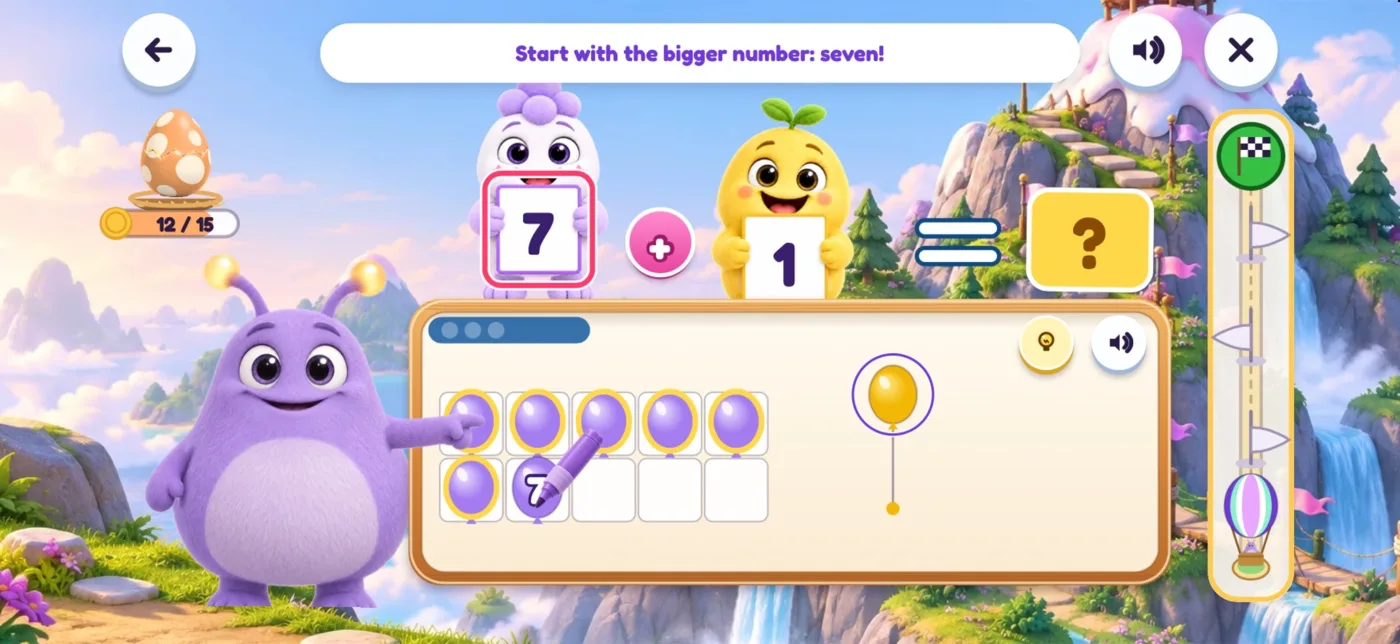
The wrong choices in each question come from mistakes children really make. Miss once, and a hint arrives for that kind of mistake. Miss twice, and Lilo works that exact problem on the same scene: a marker writes numbers, circles and draws hops right on the objects, and your child does a step ("Your turn! Tap…"). Each spoken sentence shows as a caption, and the word being said lights up. Outside the boss round, a HELP button next to every problem opens the same step-by-step lesson whenever your child asks for it. In the 30-second boss round there is no lesson: after a second miss the answer is shown and the game moves on.
5. Up when it's easy, gentler when it's hard
Each skill has levels. It moves up when your child gets five of the last six right in a reasonable time (the typical answer takes 15 seconds or less). Three misses in a row drop it one level, and the next visit brings it back easier.
6. Mastered, then reviewed
Mastered skills from around your child's grade come back as surprise reviews in the boss round, up to two per visit, on a schedule of 1, 3, 7, 14 and 30 days, so they stick. The Progress report shows each skill as Mastered, Learning, Needs help or Review due; a skill is flagged Needs help after six tries with under 60% right, or sooner, after two misses in a row.
7. A voice, not a chatbot
Every question, hint and lesson is read aloud, which helps children who can't read yet. Lilo's voice is a set of clips made before release with a text-to-speech voice and kept inside the app, so it works offline and no speech is generated while your child plays. There is no chat, no ads and no links out of the game.
Questions about the tutor
Is Lilo an AI chatbot?
No. There is no chat. Lilo's lines are voice clips made before release with a text-to-speech voice and kept inside the app: no speech is generated while your child plays, and nothing your child does is sent to an AI model. The game also plays offline.
Does Zupzi Math adapt to my child?
Yes, in three ways: the placement quiz finds the starting grade; each skill moves up a level when your child gets five of the last six right in a reasonable time and eases off after three misses in a row; and mastered skills near your child's grade come back as reviews in the boss round.
How do I see where my child needs help?
Open Grown-ups, then Progress, then your child. The Needs help tab lists skills with under 60% right after six tries, or two misses in a row. The e-mail report also says where Lilo is giving a hand.
See what Lilo teaches, skill by skill, or by grade: